Educational Technology Think Ed Tech

From the latest interactive displays and learning spaces that foster collaborative learning, to classroom audio systems and instructional software, technology plays an integral part in 21st century learning.

  [?]
Technology proficiency ranks the complexity level for teachers as they implement the product into their instruction.

Educational Technology for K–12 Classrooms

Reviewed by Teq's STEM & Instructional Technology Curriculum Specialists (OTIS for educators)

What is Educational Technology at Teq? Teq’s K–12 educational technology solutions combine interactive flat-panel displays, classroom audio and translation systems, collaborative learning software, and agile classroom furniture into a complete instructional ecosystem. Paired with ESSA-aligned professional development through OTIS for educators and hands-on iBlocks project-based learning, Teq helps schools and districts select, install, and integrate classroom technology that drives measurable student engagement across Grades K–12.

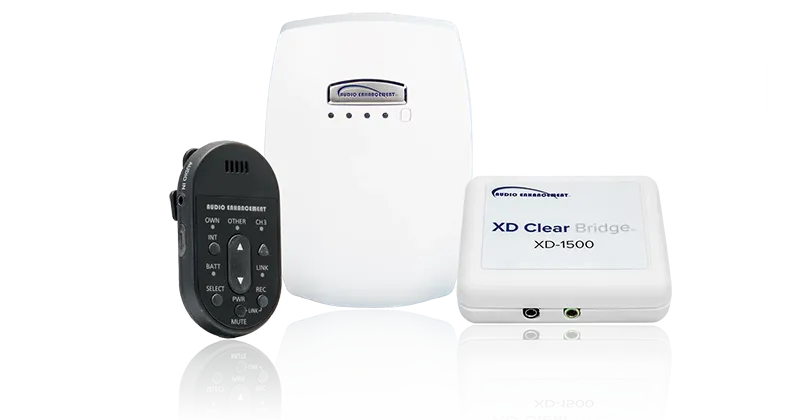
Audio Enhancement

What is Audio Enhancement? Audio Enhancement provides K–12 classroom sound amplification, teacher lanyard microphones, and school-wide IP audio systems designed to distribute crisp, even sound across every corner of the learning space. By overcoming ambient classroom noise and reducing vocal strain for educators, these systems improve student comprehension, focus, and accessibility in daily instruction.

Recommended Grade Bands: Grades K–2, 3–5, 6–8, and 9–12 (Ease of Use: Easy Proficiency)

Classroom Project Example: Students use the handheld student microphone during literacy read-alouds, Socratic seminars, and group project presentations so every classmate hears peer contributions clearly.

CLEAR Connect

What is CLEAR Connect? CLEAR Connect by Audio Enhancement is a real-time classroom translation and multi-language audio tool that pairs with classroom microphone systems to deliver live translated captioning and audio directly to student devices. Built to support English Language Learners (ELL) and multilingual classrooms, it eliminates language barriers during live instruction so all students can follow lessons simultaneously.

Recommended Grade Bands: Grades K–2, 3–5, 6–8, and 9–12 (Ease of Use: Easy Proficiency)

Classroom Project Example: Multilingual students follow a live middle school science lab demonstration in their native language alongside English terminology on their tablets while collaborating in mixed-language lab groups.

CLEAR Connect by Audio Enhancements

Clear Digital

What is Clear Digital? Clear Digital manufactures mobile LED displays, interactive digital signage, and portable Folding Walk-Up displays designed for K–12 hallways, cafeterias, auditoriums, and common areas. Paired with cloud-based content management software, schools can broadcast announcements, daily schedules, event livestreams, and emergency alerts anywhere on campus.

Recommended Grade Bands: Grades K–2, 3–5, 6–8, and 9–12 (Ease of Use: Easy Proficiency)

Classroom Project Example: High school journalism and digital media students design, schedule, and publish daily morning announcements, STEM fair highlights, and multimedia school news feeds across campus displays.

Copernicus

What is Copernicus? Copernicus provides K–12 classroom storage, mobility, and active-seating solutions—including the Tech Tub2 collection of heat-resistant ABS device charging systems, 3D Printer Carts, iRover2 interactive flat-panel mounts, and the Self-Regulation Classroom Cruiser pedal desk. With modular trolleys, carts, and easels available to stack and store tubs or move equipment from room to room, Copernicus keeps classroom devices protected, charged, and accessible wherever learning takes place.

Recommended Grade Bands: Grades K–2, 3–5, 6–8, and 9–12 (Ease of Use: Easy Proficiency)

Classroom Project Example: Elementary students use the Self-Regulation Classroom Cruiser pedal desk to channel kinesthetic energy while reading or coding, while student tech monitors transport shared tablets between learning stations using modular Tech Tub2 trolleys.

Dugga

What is Dugga? Dugga is a research-backed K–12 digital assessment platform that enables educators to create, schedule, proctor, and grade quizzes, formative checks, essays, and secure high-stakes exams across student devices. It integrates directly with Google Classroom and Microsoft Teams, supporting diverse question types, automated grading, and built-in accessibility features.

Recommended Grade Bands: Grades 3–5, 6–8, and 9–12 (Ease of Use: Easy to Intermediate Proficiency)

Classroom Project Example: Middle and high school teachers administer multimedia formative assessments with embedded video and geometry tools, giving students instant individualized feedback to guide exam review.

Dugga

Lumio by SMART

What is Lumio by SMART? Lumio by SMART is a cloud-based instructional software platform that transforms static PDFs, Google Slides, PowerPoint decks, and SMART Notebook files into interactive, game-based collaborative lessons accessible on any student device. Teachers can pace lessons live in the classroom or assign them asynchronously, using real-time digital workspaces, PhET simulations, and formative polls to track student understanding.

Recommended Grade Bands: Grades K–2, 3–5, 6–8, and 9–12 (Ease of Use: Easy Proficiency)

Classroom Project Example: Students join a shared Lumio workspace on their Chromebooks to co-construct a mind map on ecosystems and complete a Monster Quiz team review before a unit assessment.

Modular Furniture

What is Modular Furniture? Teq’s Modular Furniture line provides configurable desks, mobile tables, ergonomic and soft seating, and integrated power-management and storage systems designed for K–12 classrooms, makerspaces, libraries, commons, and STEM labs. These agile furnishings allow educators to rapidly arrange and rearrange their physical space to support direct instruction, small-group collaboration, or independent study.

Recommended Grade Bands: Grades K–2, 3–5, 6–8, and 9–12 (Ease of Use: Easy Proficiency)

Classroom Project Example: Students reconfigure mobile tables and freestanding soft seating into collaborative pods to research, construct, test, and redesign prototypes during an engineering-design iBlock project.

SMART Boards for Business

What is SMART Boards for Business? SMART Board interactive displays for business and district administration provide 4K touchscreens, integrated conferencing cameras and microphone arrays, wireless screen sharing, and real-time digital whiteboarding for boardrooms, training centers, and hybrid workspaces. Equipped with SMART TeamWorks and multi-platform video conferencing support, they allow in-room and remote participants to annotate documents and collaborate seamlessly.

Recommended Grade Bands: Grades 9–12 (Career & Technical Education) and District Administration / Professional Learning Spaces (Ease of Use: Easy Proficiency)

Classroom Project Example: District curriculum teams and CTE business classes host hybrid planning sessions where participants wirelessly cast financial models, annotate architectural plans, and export meeting notes in one click.

SMART Boards for Education

What is SMART Boards for Education? SMART Board interactive flat-panel displays—including the QX Pro, RX, and MX series—combine 4K Ultra HD touchscreens, simultaneous multi-user tool differentiation, and built-in iQ Android computing with walk-up-and-teach whiteboard software. Designed specifically for K–12 classrooms, they allow multiple students to write, erase, and move digital objects at the same time without interrupting one another.

Recommended Grade Bands: Grades K–2, 3–5, 6–8, and 9–12 (Ease of Use: Easy Proficiency)

Classroom Project Example: Four students work simultaneously at the SMART Board during a math workshop—using pens, digital manipulatives, and palm erasers concurrently—to solve multi-step geometry problems side by side.

SMART Boards Education

SMART Document Camera 550

What is the SMART Document Camera 550? The SMART Document Camera 550 is a portable, Wi-Fi-enabled Ultra HD classroom visualizer with a flexible gooseneck, built-in microphone, and microscope adapter that streams live 3D objects, printed texts, and hands-on demonstrations directly to a SMART Board or student displays. It integrates natively with SMART Notebook and Lumio software so teachers can capture, annotate over, and save live video feeds from anywhere in the room.

Recommended Grade Bands: Grades K–2, 3–5, 6–8, and 9–12 (Ease of Use: Easy Proficiency)

Classroom Project Example: A biology teacher attaches the SMART Document Camera 550 to a classroom microscope to project live cellular slides onto the SMART Board while students label cell structures directly over the image.

Wall Mounts and Mobile Stands

What is Teq’s Wall Mounts and Mobile Stands Collection? Teq’s Wall Mounts and Mobile Stands include UL-listed fixed wall mounts, motorized height-adjustable mobile carts, and over-the-chalkboard mounting systems engineered to securely support large-format SMART Board interactive displays across K–12 classrooms. Adjustable stands allow educators and students of all ages and mobility levels to raise, lower, or wheel displays between learning zones safely.

Recommended Grade Bands: Grades K–2, 3–5, 6–8, and 9–12 (Ease of Use: Easy Proficiency)

Classroom Project Example: An elementary teacher lowers a motorized mobile stand to floor level so kindergarteners and wheelchair-using students can comfortably reach the top of the SMART Board during morning calendar routines.