STEM Technology Think STEM

STEM is the perfect place to start transforming your classroom. By giving students the right tools and technology, you can spark curiosity, learning, and inquiry-based thinking.

  [?]
Technology proficiency ranks the complexity level for teachers as they implement the product into their instruction. Curriculum versatility indicates products with a higher versatility, meaning they can be used in multiple subject areas or grade levels compared to products that are more subject and/or grade specific.

K–12 STEM Technology & Classroom Makerspace Solutions

Reviewed by Teq's STEM & Instructional Technology Curriculum Specialists (OTIS for educators)

What STEM Technologies Does Teq Provide for Schools? Teq provides turnkey K–12 STEM technology solutions—spanning 3D printing, coding and robotics, AR/VR, laser cutting, circuitry, and hydroponics—paired with accredited educator professional development on OTIS for educators and custom project-based learning curricula through iBlocks. Schools and districts use the directory below to filter classroom hardware and software by Grade Level (Pre-K–12), Subject Matter, Technology Proficiency (Easy to Advanced), and Curriculum Versatility.

3Doodler

What is 3Doodler? 3Doodler is a classroom 3D pen that extrudes heated plastic from the pen’s nozzle that hardens in seconds—allowing students to draw on flat surfaces or build 3D structures in mid-air with no computer or CAD software required. With models tailored to different age groups (Start+, Flow, and Pro+), students can explore tactile concepts in art, geometry, and engineering right from their desks.

Recommended Grade Bands: Grades 3–5, 6–8, and 9–12 (Ease of Use: Easy)

Classroom Project Example: Elementary and middle school students construct 3D geometric polyhedra, bridge trusses, or symmetrical models of objects found in nature.

Bambu Lab

What is Bambu Lab? Bambu Lab manufactures high-speed, multi-color, and multi-material desktop 3D printers designed for K–12 classrooms and makerspaces. Paired with free, open-source Bambu Studio slicing software, students can prepare, adjust, and print vibrant multi-color CAD prototypes with high precision and minimal setup time.

Recommended Grade Bands: Grades K–2, 3–5, 6–8, and 9–12 (Ease of Use: Easy to Intermediate)

Classroom Project Example: Students design and print color-coded topographical maps, anatomical models, or mechanical gears in CAD and engineering units.

Bambu Lab 3D Printers

BirdBrain Technologies

What is BirdBrain Technologies? Founded at the CREATE Lab at Carnegie Mellon University in 2010, BirdBrain provides flexible robotics platforms—the Hummingbird Bit robotics kit and the Finch robot—powered by micro:bit. Hummingbird lets students build, customize, and program their own animatronic robots out of craft materials and electronic sensors, while Finch scales from icon- and block-based coding up to Python and Java on any device.

Recommended Grade Bands: Grades K–2, 3–5, 6–8, and 9–12 (Ease of Use: Intermediate)

Classroom Project Example: Students combine craft supplies with Hummingbird motors and sensors to build interactive kinetic sculptures that demonstrate basic physics concepts and simple machines, supported by the OTIS course Intro to micro:bit.

Breakout EDU

What is Breakout EDU? Breakout EDU is a K–12 game-based learning platform that brings the collaborative challenge of an escape room into the classroom through physical lock-and-box kits and hundreds of customizable digital puzzle games. It enables students to practice critical thinking, cryptography, and trial-and-error problem-solving across any academic subject.

Recommended Grade Bands: Grades K–2, 3–5, 6–8, 9–12 (Ease of Use: Easy to Intermediate)

Classroom Project Example: Students collaborate to solve—or design their own—historical escape room based on a specific time period or literary text, creating multi-step clues and combination locks that classmates must decipher to open the physical Breakout EDU box.

ClassVR

What is ClassVR? ClassVR is a standalone virtual and augmented reality classroom solution featuring the Xplorer and Xcelerate headsets paired with the Eduverse+ online learning platform. Designed specifically for K–12 durability and accessibility, it delivers curriculum-aligned AR/VR lessons and teacher classroom controls that build student communication, teamwork, and problem-solving skills.

Recommended Grade Bands: Grades 3–5, 6–8, 9–12 (Ease of Use: Intermediate)

Classroom Project Example: Students take a guided 360-degree virtual field trip through global ecosystems or historical landmarks in Eduverse+ to analyze environmental and architectural structures firsthand.

ClassVR

Cricut

What is Cricut? Cricut manufactures smart cutting machines—including the Cricut Maker 3, Explore 3, Venture, and Joy series—designed for K–12 classrooms and school makerspaces. Paired with an easy-to-use design app, students and educators can cut vinyl, cardstock, paper, leather, and fabric with digital precision to build engineering models, classroom displays, and custom apparel.

Recommended Grade Bands: Grades K–2, 3–5, 6–8, and 9–12 (Ease of Use: Intermediate)

Classroom Project Example: Students design and cut accurate geometric nets, structural patterns for engineering prototypes, or custom banners, t-shirts, and water bottles for school spirit and fundraising events.

Cubelets (Modular Robotics)

What are Cubelets? Cubelets are pre-programmed, magnetic robot blocks categorized into SENSE, THINK, and ACT functions that snap together to build working robots with no screens or wiring required. As students progress, they can attach the Bluetooth Hat to reprogram individual blocks and explore data flow, logic gates, and computational thinking through a tactile and visual process.

Recommended Grade Bands: Grades Pre-K–2, 3–5, 6–8, and 9–12 (Ease of Use: Easy)

Classroom Project Example: Elementary students snap together Brightness Sense, Inverse Think, and Drive Act blocks to engineer an autonomous light-seeking rover or a darkness-activated lighthouse while testing cause-and-effect relationships.

Dobot

What is Dobot? Dobot provides industrial-grade, programmable desktop robotic arms—including the Magician EDU, MG400, and Magician E6—that teach middle and high school students about coding, manufacturing, and automation. Equipped with interchangeable end-effectors for 3D printing, laser engraving, writing, drawing, and pneumatic gripping, Dobot supports Blockly, Python, and teach-and-playback programming.

Recommended Grade Bands: Grades 6–8 and 9–12 (Ease of Use: Advanced)

Classroom Project Example: Middle and high school CTE students design their own custom product prototype and program a Dobot robotic arm with conveyor belt and vision kit accessories to simulate an automated mass-production assembly line.

eufyMake

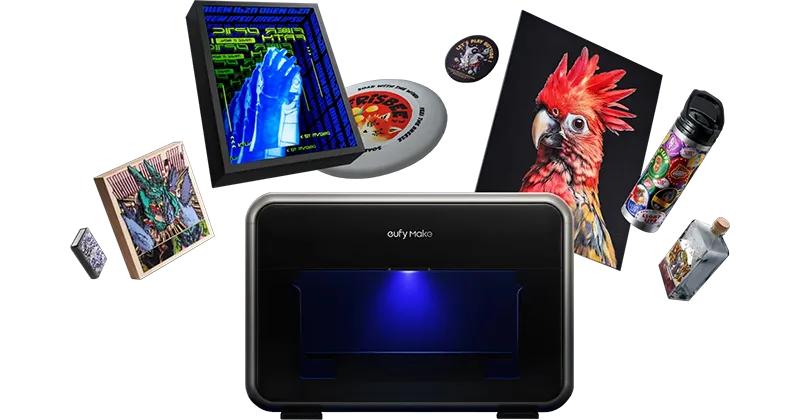
What is the eufyMake UV Printer E1? The eufyMake UV Printer E1 is a desktop UV-curable printer that applies full-color, textured 3D designs directly onto flat and cylindrical surfaces—including wood, acrylic, metal, and canvas. It bridges digital graphic design and physical fabrication in school makerspaces and STEAM labs.

Recommended Grade Bands: Grades 6–8 and 9–12 (Ease of Use: Intermediate)

Classroom Project Example: Students prototype custom embossed signage, tactile Braille learning aids, and textured product packaging in art, design, and entrepreneurship courses.

eufyMake UV Printer E1

Formlabs

What is Formlabs? Formlabs stereolithography (SLA) 3D printers—including the Form 4—use linear illumination and a flexible tank to cure liquid resin into high-precision, industrial-quality prototypes. Integrated sensors automatically monitor and maintain ideal print conditions so secondary and CTE students can focus on advanced digital manufacturing and engineering design.

Recommended Grade Bands: Grades 6–8 and 9–12 (Ease of Use: Intermediate)

Classroom Project Example: High school engineering and biomedical students fabricate smooth, tight-tolerance mechanical assemblies, dental/medical models, and functional product prototypes.

Gif-O-Graf

What is Gif-O-Graf? Gif-O-Graf (Animation Machine V2) is a hands-on 2D stop-motion animation studio that captures frame-by-frame images of paper cut-outs and physical artwork to produce shareable digital animations via QR code. Designed for classrooms, libraries, and makerspaces, it combines physical craft materials with included STEAM curriculum to build collaborative storytelling and visual arts skills with no prior animation experience required.

Recommended Grade Bands: Grades K–2, 3–5, 6–8, and 9–12 (Ease of Use: Easy)

Classroom Project Example: Students design articulated construction-paper characters and background scenes to film a stop-motion animation explaining a scientific life cycle or retelling a historical event, supported by the OTIS course Bringing Stories to Life with Cricut.

Gif-O-Graf

KUBO

What is KUBO? KUBO is a screen-free coding robot that introduces elementary students to computational thinking using a puzzle-like system called TagTile. By snapping tactile puzzle tiles together on an activity map and rolling the KUBO robot over them, even technology-shy learners can master functions, subroutines, and loops as easily as piecing together a puzzle.

Recommended Grade Bands: Grades K–2 and 3–5 (Ease of Use: Easy)

Classroom Project Example: Elementary students combine STEM and English Language Arts by laying out TagTile coding pathways to navigate KUBO across an illustrated story map while narrating an original creative story.

Lego Education

What is LEGO Education? LEGO Education provides hands-on K–8 STEAM and science classroom solutions—including LEGO Education Science Kits (K–2, 3–5, and 6–8) and the LEGO Education SPIKE Prime robotics set—complete with LEGO bricks, motors, sensors, and Scratch-to-Python coding apps. Paired with over 120 NGSS-, ISTE-, and CSTA-aligned lessons in the free Teacher Portal, it integrates physical engineering with life science, earth science, math, and literacy.

Recommended Grade Bands: Grades K–2, 3–5, and 6–8 (Ease of Use: Easy to Intermediate)

Classroom Project Example: Middle school students build and program a sensor-equipped SPIKE Prime prototype or work in four-student teams with a LEGO Education Science Kit to model physical forces, energy transfer, and engineering design within a single class period.

Lego Education

Makerbot

What is MakerBot? MakerBot 3D printers—including the fast, enclosed MakerBot Sketch Sprint—give educators a turnkey way to introduce 3D design and printing across all K–12 subjects. With a simple setup experience, intuitive hardware and cloud slicing software, and dedicated OTIS for educators professional development (MakerBot Replicator+ Basics), teachers can seamlessly integrate 3D printing into STEM, ELA, and social studies.

Recommended Grade Bands: Grades K–2, 3–5, 6–8, and 9–12 (Ease of Use: Intermediate)

Classroom Project Example: Students design historical artifacts in social studies or custom architectural models while practicing the engineering design process.

Makey Makey

What is Makey Makey? Makey Makey is a hands-on circuitry and invention kit that uses high-resistance switching to turn everyday conductive and low-conductivity materials—such as leaves, pasta, graphite, or people—into computer keyboard and mouse inputs. Designed for cross-curricular STEAM integration, it helps students explore circuit design, conductivity, and block-based coding by building custom game controllers, musical instruments, and interactive models.

Recommended Grade Bands: Grades 3–5, 6–8, and 9–12 (Ease of Use: Easy to Intermediate)

Classroom Project Example: Students wire conductive touchpoints into illustrated Earth science, space-system models, or light-up paper circuits to trigger interactive audio and Scratch animations, supported by the OTIS course Makey Makey Circuits.

Maplewoodshop

What is Maplewoodshop? Maplewoodshop is a portable, power-tool-free classroom woodworking station featuring a lockable tool chest, collapsible tabletop workbenches for up to 16 students, over 220 safe hand tools, and an online curriculum and teacher training platform. It transforms any standard classroom or STEAM lab into a safe woodshop that builds executive functioning, measurement, and career and technical education (CTE) trade skills.

Recommended Grade Bands: Grades K–2, 3–5, 6–8, and 9–12 (Ease of Use: Easy)

Classroom Project Example: Students work in pairs at portable workbenches using hand saws, combination squares, and block planes to measure, cut, and assemble a functional wooden box guitar while exploring acoustics, fractions, and structural design.

Mastery Coding

What is Mastery Coding? Mastery Coding provides standards-based K–12 computer science curricula covering computational literacy, web and video game development, and academic esports for in-person, remote, or hybrid classrooms. Its cross-disciplinary pathways guide students from foundational elementary coding to middle school STEM projects and high school industry-recognized certifications.

Recommended Grade Bands: Grades 3–5, 6–8, 9–12 (Ease of Use: Intermediate)

Classroom Project Example: Middle and high school students build coding portfolios in game development and launch a student-run academic esports team to manage roles, analyze game strategy, and compete in local and national tournaments.

Mastery Coding

Piper

What is Piper? The Piper Computer Kit is a hands-on STEAM learning system where students assemble a working Raspberry Pi-powered computer from hardware components, wires, and physical electronics. Once built, students learn computer science, electronics, and design thinking through Piper’s StoryMode in the Raspberry Pi Edition of Minecraft and visual block-based programming in PiperCode (powered by Google Blockly).

Recommended Grade Bands: Grades 3–5 and 6–8 (Ease of Use: Intermediate)

Classroom Project Example: Upper elementary and middle school students build and wire their own functional computer to complete the Coding and Classifying: Ready, Set, Sort! iBlock, supported by the OTIS course Intro to Programming Education.

Rev Robotics

What is REV Robotics? REV Robotics provides modular, competition-grade robotics kits—such as the REV EDU V2 Robotics Kit and Starter Kit V3.1 Upgrade—complete with extruded metal structural systems, control hardware, servos, motors, and sensors. Designed for classroom engineering labs, afterschool clubs, and robotics competitions, REV bridges classroom STEM principles with real-world mechanical engineering.

Recommended Grade Bands: Grades 6–8 and 9–12 (Ease of Use: Intermediate to Advanced)

Classroom Project Example: High school engineering students follow the REV Robotics I curriculum to wire, assemble, and program a teleoperated drivetrain and articulated lift mechanism from start to finish while practicing lab safety and competition design standards.

Rev Robotics

Rocket Drones

What is Rocket Drones? Rocket Drones is a comprehensive secondary STEM aviation program offering Classroom STEM Kits, indoor Drone Racing Programs, and career-readiness pathways that prepare students ages 13 and up for FAA Part 107 commercial drone certification. Students build technical proficiency, teamwork, and autonomous flight-coding skills tied directly to aviation and engineering careers.

Recommended Grade Bands: Grades 6–8 and 9–12 (Ease of Use: Intermediate)

Classroom Project Example: Middle and high school teams plan and code an autonomous indoor search-and-rescue drone flight mission, navigating obstacle courses to locate and document simulated emergency targets.

SCIVR

What is SCIVR? SCIVR is an all-in-one virtual reality content platform featuring a comprehensive library of interactive, 3D STEM modules for middle and high school instruction. It enables students to explore complex scientific concepts, career pathways, and real-world challenges through story-driven simulations in physics, chemistry, biology, earth science, and mathematics.

Recommended Grade Bands: Grades 6–8, 9–12 (Ease of Use: Intermediate)

Classroom Project Example: Students conduct virtual chemistry experiments and simulate laboratory scenarios inside story-driven VR modules without physical lab safety risks or consumable costs.

SCIVR

Shaper Origin

What is Shaper Origin? Shaper Origin is a handheld computer numerical controlled (CNC) router that brings digital precision to high school woodshops, CTE programs, and makerspaces without requiring G-code programming. Using an interactive touchscreen, automatic workspace scanning, and motorized cut correction, students can accurately cut, carve, and shape wood, plastic, and soft metals alongside the Shaper Workstation and Shaper Studio software.

Recommended Grade Bands: Grades 9–12 (Ease of Use: Intermediate to Advanced)

Classroom Project Example: Students apply 3D design and fraction concepts to rout precision joinery, custom wooden signage, and multi-material prototypes that combine CNC woodwork with 3D-printed and laser-cut parts.

Shaper Origin

Strawbees

What is Strawbees? Strawbees are versatile building and robotics kits made of reusable connectors, flexible building straws, and micro:bit-compatible servo components that let students rapidly prototype mechanical inventions. Paired with curriculum-aligned lessons in Strawbees Classroom, the kits develop structural engineering, creative problem-solving, and coding skills.

Recommended Grade Bands: Grades K–2, 3–5, and 6–8 (Ease of Use: Easy)

Classroom Project Example: Upper elementary and middle school students engineer working scale models of motorized amusement park rides—such as Ferris wheels and swing carousels—coded with micro:bit controllers.

Tower Garden

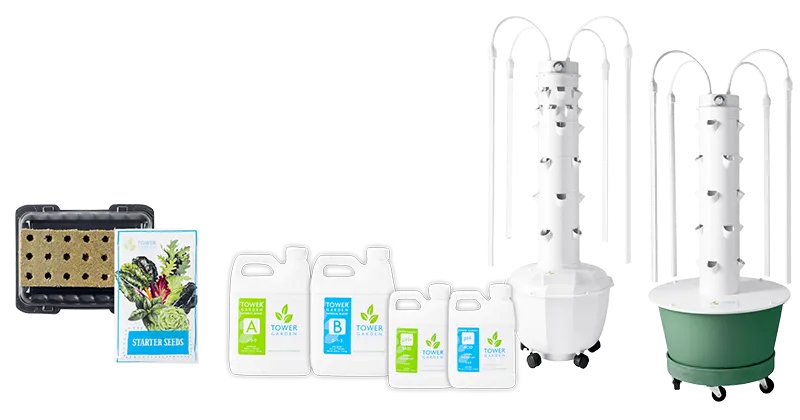
What is Tower Garden? Tower Garden is a vertical, aeroponic growing system equipped with a self-watering reservoir, automated timer pump, and grow lights designed for indoor classroom cultivation. It pairs compact hardware with STEM lesson plans so students can observe root development and plant growth cycles firsthand without needing outdoor garden space.

Recommended Grade Bands: Grades K–2, 3–5, 6–8, 9–12 (Ease of Use: Beginner)

Classroom Project Example: Students track daily pH levels, water nutrient conductivity, and vertical leaf growth rates across different leafy greens to compare aeroponic yields against traditional soil planting.

Tower Garden

UBTECH

What is UBTECH? UBTECH Education offers vertically aligned, programmable robotics kits—including UKIT Beginner, Intermediate, Advanced, uKIT AI, and UGOT—paired with NGSS-aligned curriculum. Students snap together interlocking parts and precision servos to assemble pre-made robotic models or invent custom AI-powered designs across math, physical science, and life science units.

Recommended Grade Bands: Grades K–2, 3–5, 6–8, and 9–12 (Ease of Use: Intermediate)

Classroom Project Example: Students work through the engineering design process to construct, code, and test a motorized robotic forklift capable of lifting and transporting classroom payloads.

UltiMaker

What is UltiMaker? UltiMaker desktop 3D printers combine active bed leveling and swappable dual-extrusion nozzle systems for high uptime and repeatable results in busy school makerspaces. Powered by UltiMaker Cura—the industry-standard open-source slicing software—and supported by OTIS for educators PD (Ultimaker: Optimizing Your 3D Print), UltiMaker prepares students for industry-recognized CAD and additive manufacturing pathways.

Recommended Grade Bands: Grades K–2, 3–5, 6–8, and 9–12 (Ease of Use: Intermediate)

Classroom Project Example: Physics and engineering students design and print custom vehicles and simple machines to test forces, motion, and mechanical interactions.

Wonder Workshop

What is Wonder Workshop? Wonder Workshop provides playful, durable classroom robots—including Dash and Dot—packed with programmable LEDs, proximity sensors, microphones, and expressive movement. Designed to work right out of the box with no assembly required, Dash and Dot turn coding and computer science into a collaborative, whole-class problem-solving activity.

Recommended Grade Bands: Grades K–2, 3–5, and 6–8 (Ease of Use: Intermediate)

Classroom Project Example: Elementary students program Dash to navigate a floor-grid map during a Social Studies map-skills unit or draw polygon angles using the Gripper and Sketch Kit, supported by the OTIS course Tech-Infused Learning: Geometry with Dash.

xTool

What is xTool? xTool by Makeblock offers desktop laser cutters and engravers engineered for K–12 STEAM labs and makerspaces. Paired with free design software, systematic tutorials, and standards-aligned curriculum, students can transform digital sketches into precision-cut and engraved projects across wood, acrylic, and metal.

Recommended Grade Bands: Grades 3–5, 6–8, and 9–12 (Ease of Use: Intermediate)

Classroom Project Example: Students design, laser-cut, and assemble multi-layered wooden labyrinth games, interlocking mechanical gears, or architectural scale models in STEAM and engineering units.