How to Build an Elementary School Makerspace from Scratch
Marketing Team
Blog
Teq Supports District Implementation: Beyond funding guidance, Teq provides turnkey grant alignment, hardware staging, and certified PD coaching via OTISpd.com to ensure 100% classroom adoption.
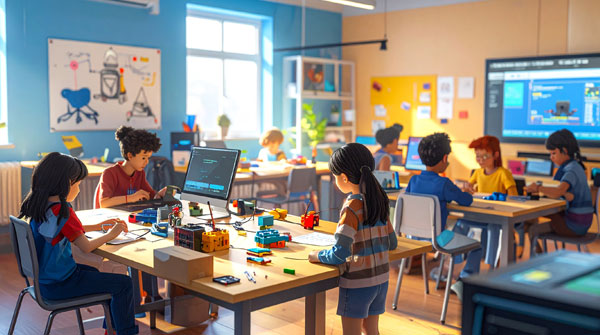
Creating a dynamic makerspace in an elementary school is one of the most transformative, yet complex, undertakings a district can pursue in 2026. When aligned properly with clear instructional goals, these innovation hubs drastically improve 21st-century skill development—specifically critical thinking, creativity, and collaboration. However, the greatest trap in makerspace procurement is buying the latest “shiny objects” first. A successful makerspace is not defined by its physical tools but by the community of critical thinkers, makers, and problem solvers it empowers. This comprehensive blueprint outlines the exact steps for designing, equipping, and launching a functional makerspace that integrates a rigorous STEAM curriculum and foundational methods for teaching coding.
What is an Elementary School Makerspace?
An elementary school makerspace is a dedicated, collaborative learning environment where students have access to tools, materials, and technology to design, experiment, and invent. Rather than passively consuming information, students in a makerspace engage in hands-on, project-based learning. These spaces typically bridge the gap between physical crafting (like cardboard construction) and digital fabrication, serving as an ideal environment for introducing robotics, engineering concepts, and classroom coding.
Phase 1: Conducting a Needs Analysis and Space Design
Educational outcomes must dictate the architecture, not the other way around. Before writing purchase orders, administrators must align school stakeholders around specific learning goals to ensure the physical layout and tool selections naturally fall into place.
According to the TAME Makerspace Guidebook (2026), schools must first decide on a structural layout that matches their space constraints and budget:
- Dedicated Makerspace: A standalone room, often a retrofitted computer lab, serving the entire school.
- Library Media Center Integration: Placing the makerspace in a shared common room to heavily support cross-curricular projects.
- Mobile Maker Cart: A flexible, rolling cart stocked with materials that can be signed out and wheeled into individual classrooms.
- Classroom Maker Corner: A small, permanent center integrated directly within a single classroom.
A successful design process starts with pedagogical outcomes. Meteor Education’s K–12 Design Guide (2026) recommends identifying which grade levels will use the space, the three to five student outcomes the space must support, and how teachers will configure the room. Furthermore, physical infrastructure is critical. Design Hive emphasizes the need for grounded perimeter electrical outlets, sinks for clean-up, and stable internet connectivity for cloud-based design and teaching coding platforms.
Phase 2: Procuring the Right Starter Hardware
A low-threshold, high-impact equipment list ensures that students of all technical levels can immediately engage with the makerspace. An effective list blends physical crafting with digital fabrication and physical computing.
| Category | Recommended Starter Gear | Purpose & Target Skills |
| Tactile Prototyping | Makedo Cardboard Tool Sets | Safe, rapid prototyping using cardboard screws and saws. |
| Mechanical Prototyping | K’NEX Maker Kits or LEGO(R) | Encourages spatial reasoning and structural stability (District Administration). |
| Physical Computing | Makey Makey Kits | Teaches basic circuitry and interactive inputs. |
| Robotics & Coding | Wonder Workshop: Dash | Tactile introductions to block-based logic for classroom coding. |
| Low-Barrier Electronics | Snap Circuits or Cubelets | Safe exploration of electrical pathways and outputs. |
| High-Tech Fabrication | MakerBot Sketch or Bambu Labs 3D printers | Brings 3D CAD modeling into the physical world safely (1stMakerspace). |
Pro Tool Selection Tip: Never underestimate the power of free, familiar materials. For K-5 students, cardboard is the ultimate prototyping material. To make building safe and efficient, educators recommend specialized cutting tools like the Worx ZipSnip Cardboard Cutter and Canary Cardboard Scissors to cut heavy boxes quickly without injury (Renovated Learning).
Phase 3: Establishing Rigorous Safety Protocols
A healthy elementary makerspace balances curiosity with safety. Cultivating a robust safety culture involves administrative oversight, structured student training, and highly transparent communication.
1. Administrative Safety Protocols
According to the POPProbe School Makerspace Checklist, administrators must conduct monthly inspections covering emergency preparedness, tool guarding (complying with OSHA standards), and proper ventilation for adhesive fumes or 3D printers.
2. The “Maker Mantra”
To make safety second nature for young learners, the Maker Media Makerspace Playbook advises creating an easily chanted daily ritual. Before fabrication begins, classes should repeat: “Protect. Double-check. Aim away. Clamp it. Focus. Never play.”
3. Student Training & Competency Checks
The MIT Edgerton Center K-12 Maker Lab advocates for a formal competency program. Before students use high-tier equipment, they must receive hands-on training, demonstrate active competency to an instructor, record their “tool badges” on a training log, and have a signed safety contract on file.
Phase 4: Integrating STEAM Curriculum and PBL
Having the ultimate makerspace layout and hardware is meaningless without a meaningful curriculum. A makerspace truly thrives when it shifts from passive crafting to rigorous, standards-aligned Project-Based Learning (PBL) and Challenge-Based Learning (CBL).
Research published in The STEAM Journal notes that when elementary students are presented with open-ended challenges, they demonstrate higher levels of motivation and creative risk-taking. However, designing interdisciplinary STEAM lessons requires immense planning—often up to 150 hours per unit.
Overcoming “PBL Overhead” with Turnkey Solutions
To prevent teacher burnout and effectively utilize makerspace hardware, schools must provide structured frameworks. As Damian Scarfo, Chief Executive Officer at Teq, notes: “Equipment is not the silver bullet… Our philosophy is to focus on outcomes. We have learned… how to design, create, and deliver the complete thought—a solid foundation for learning that includes tools, equipment, and instructional solutions that spark the mind” (Teq iBlocks Pathways Catalog).
This is where Teq’s iBlocks (Instructional Blocks) excel. An iBlock is a flexible 10-module, student-led, teacher-guided PBL solution that saves over 150 hours of planning. By utilizing curriculum integration solutions like iBlocks, schools eliminate the “PBL planning tax”—turning educators from exhausted lesson planners into inspired classroom coaches.
Exemplary pathways include:
- The Class Pet iBlock (Grades K-2, 3-5): Students research pet needs and use low-threshold microcontrollers to build an interactive robotic pet out of cardboard, perfectly blending biology with tactile crafting and early teaching of coding concepts (iBlocks Sample Downloads).
- Jurassic Kids: Design a Dinosaur (K-2): Students will embark on a prehistoric adventure! They’ll discover unknown facts and features about dinosaurs before designing their own. Finally, they’ll present their new creation for show and tell. (Explore Teq’s PBL solutions)
- The Rube Goldberg Machine iBlock (Grades 3-5): Students solve simple physical tasks using complex chain reactions, testing kinetic energy and simple machines using recycled materials (Explore iBlocks Library).
Strategic Recommendations for Launching Your Makerspace
To ensure the long-term success and academic viability of a new elementary makerspace, school districts should follow these final strategic steps:
- Invest in Professional Development First: Do not let hardware sit in boxes because teachers are intimidated by it. Establish robust professional training schedules through resources like OTIS for Educators by Teq, ensuring staff understand both the technical tools and how to facilitate student-led learning.
- Standardize a “Driver’s License” Program: By establishing a rigorous, badged competency program, schools make safety an empowering badge of honor rather than a set of restrictive rules.
- Connect Activities to Curriculum Goals: Ensure the space is not viewed as a “free play” room. Integrate structured curriculum blocks that bridge mathematics, science, language arts, and classroom coding into unified projects.
- Cultivate Inclusivity & Equity: Align makerspace design with Universal Design for Learning (UDL) frameworks to ensure every child has equal access to hands-on learning experiences (Minnesota Department of Education STEAM Guidance).
Building an elementary makerspace from scratch requires intentional design, targeted hardware procurement, and an unwavering commitment to a robust STEAM curriculum. By prioritizing pedagogical outcomes and supporting educators with the right frameworks, districts can cultivate a generation of confident, creative problem-solvers.
Related Articles & Other Recommended Reading

What AI Tools Are Teachers Actually Using?
While having a variety of AI tools at your fingertips is helpful, the number of options can feel overwhelming. In our OTIS for educators session, “Demystifying AI Tools,” we’ll dive into the top AI platforms being used in education. We’ll uncover their ideal use cases, abilities, and limitations so that you can find the best fit(s) […]

Beat the June Burnout: 7 Low-Stress PD Sessions to Prep for Next Year
The countdown is on! Whether you’re a teacher officially on break or school is still in session, we’re celebrating another successful year. You’ve earned the time off to relax and maintain your skills with OTIS for educators! We’ve got tons of engaging PD courses all year round and have curated courses that will perfectly pair […]

Catch Teq at ISTE 2026!
Teq is ecstatic to attend the annual International Society for Technology in Education (ISTE) Live26! We’re excited to connect with educators and leaders alike to integrate cutting-edge edtech solutions that transform classroom instruction. Taking place from June 28th to July 1st, 2026, this top-notch event is being held at the Orange County Convention Center in […]