Using AI To Create Quick Activities and Assessments with Conker.ai
Lindsey Merrow
Curriculum Specialist
News
Teq Supports District Implementation: Beyond funding guidance, Teq provides turnkey grant alignment, hardware staging, and certified PD coaching via OTISpd.com to ensure 100% classroom adoption.
Conker.ai can be added to the growing list of artificial intelligence tools that can help support teachers, especially if you are teaching in a Google district. Conker.AI is working on becoming a more robust tool. It doesn’t have too many bells and whistles so far. However, it is a really great and simple tool to get started with using artificial intelligence in the classroom! To use it, you will need to give the app permission to access your Google Drive, which has become a pretty standard practice with many websites and applications.
Qualms about AI
Conker is from Mote, a company that is widely used by educators for creating voice notes. That fact may help foster some trust with providing it access. They are also working on making it COPPA compliant, so while this is a great tool for creating activities, assessments, and allowing you some options in getting that content to students, I’d hold off on having them use the site directly until they’re compliant.
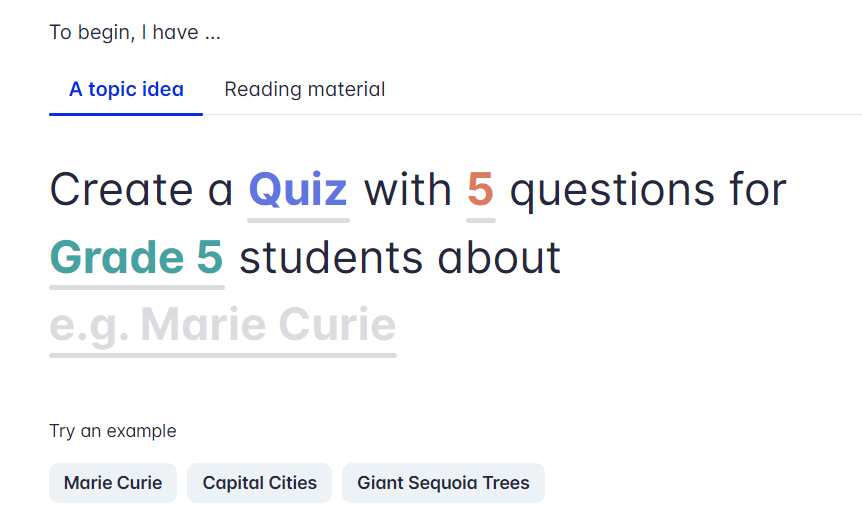
Despite my hesitancy on allowing students to use this, I was curious to see how well Conker would support classroom needs. Currently, Conker is a free tool that allows teachers to create quizzes, fill-in-the-blank activities, true/false questions, and more that can then be easily exported to a Google Form. When you first login, you will see a prompt like the one below:
How to get started
If you see something underlined in Conker.AI, that means it is something that can be edited. Click on the underlined items and a drop down menu will appear. So for example, the word “quiz” in the above image is clickable. If you click the word the dropdown will give you other options. So, rather than the default quiz, you can choose “Fill in the blank” or “Read & Respond.” Instead of a five question output, you can select anywhere from 5-10. You can also choose a grade range from kindergarten all the way up to higher education.
Next, you simply type in a topic and watch the magic happen, or you can copy and paste source material from the lesson you’re working on. Once the topic/material is placed, click on “generate” and watch as it creates a quick activity/assessment for your students! This is such a unique way to generate exit tickets, check ins, informal assessments, and more. Below is my generated quiz from a search for 8th grade questions on the Roman Empire.
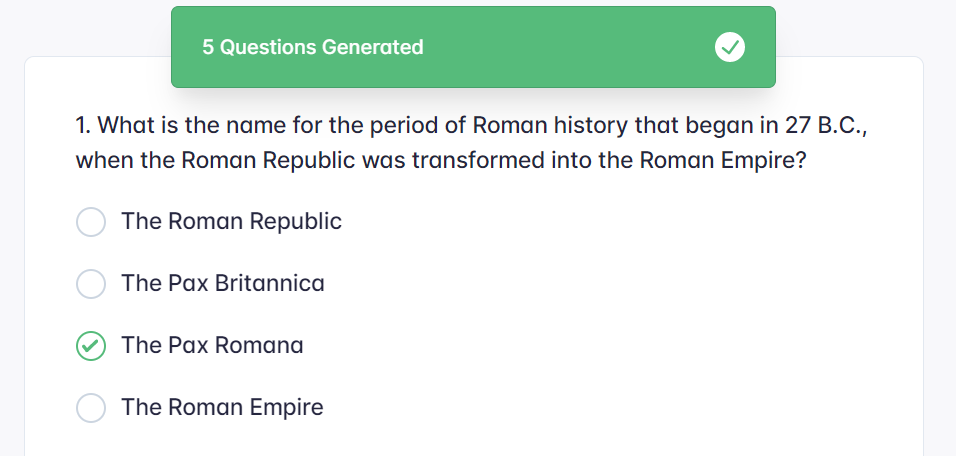
This is such a helpful tool for those in Google districts. This is especially because it will offer you the ability to export it to a Google Form. Once in a Form, you will be able to gather results from students in your classroom. The advantage of being able to export this to a Google Form is that you can then easily assign it to students and even set up the Form as a graded quiz.
More from OTIS
Conker.AI is a great way to make quick, differentiated activities in your classroom by allowing you to change the type of question, grade level, and more. Additionally, by posting it with this tool, students can access their digital accessibility tools online, such as text-to-speech, to read them the questions. For more on AI and Google tools, check out our OTIS courses and keep your eyes on the blog!
For more tips, tricks, and tools for teaching in and out of the classroom, check out more content on the Teq Talk blog or our YouTube channels OTIS for educators and Tequipment.
We also offer virtual professional development, training, and support with OTIS for educators. Explore the technology and strategies that spark student success — no matter where teaching or learning are happening!
Follow us on social:
 edteq
edteq  OTIS4educators | Teq Products | iBlocks
  OTIS4educators | MyTeq
  Teq
Teq
0 thoughts on “Using AI To Create Quick Activities and Assessments with Conker.ai”
Related Articles & Other Recommended Reading

How to Safely Store Your AR/VR Headsets for the Summer
As the school year comes to a close, properly preparing your AR/VR hardware for summer storage is essential to extending the lifespan of your investment. Taking a few deliberate steps ensures that when teachers and students return in the fall, their headsets, controllers, and charging carts will be clean, functional, and ready for classroom use. […]

Teq Tuesdays: Summer PD Lineup
Summer is here, and so are Teq’s annual summer PD sessions! Join us on select Tuesdays in July and August for a variety of engaging professional learning experiences. Our summer PD lineup this year dives into unlocking the full potential of AI and brushing up on core Google Workspace skills. All sessions will be broadcast […]

What AI Tools Are Teachers Actually Using?
While having a variety of AI tools at your fingertips is helpful, the number of options can feel overwhelming. In our OTIS for educators session, “Demystifying AI Tools,” we’ll dive into the top AI platforms being used in education. We’ll uncover their ideal use cases, abilities, and limitations so that you can find the best fit(s) […]