Creating Your Own Games in Breakout EDU
Michelle Hollander
Director of Educational Content
iBlocks
Teq Supports District Implementation: Beyond funding guidance, Teq provides turnkey grant alignment, hardware staging, and certified PD coaching via OTISpd.com to ensure 100% classroom adoption.

Are you looking for a fun and interactive tool to engage your learners? Breakout EDU can help students unlock a love for learning by applying knowledge with higher order thinking, a developing growth mindset, and perseverance.
The Breakout EDU platform boosts teamwork, empathy, and problem-solving through learner-centered experiences. Students can solve digital and kit-based games, or even take on Lock of the Day, which is a daily 5-10 minute single lock puzzle. Additionally, you can have students participate in immersive point-and-click adventures with Breakout+.
Must-see features and game templates
One of the coolest features of Breakout EDU is the Game Design Studio! To get started, both students and educators are encouraged to participate in the Learn & Play course modules. After watching a video, they can complete practice games for six different levels, exploring the elements that make for a compelling game.
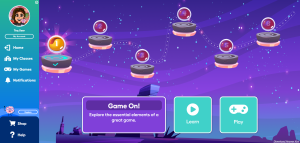
The creation of a successful game involves creating a great story that provides purpose, engages players, weaves clues together, and moves the game forward. These are all possible within the Game Design feature. Rubrics and templates are provided to further guide this process.
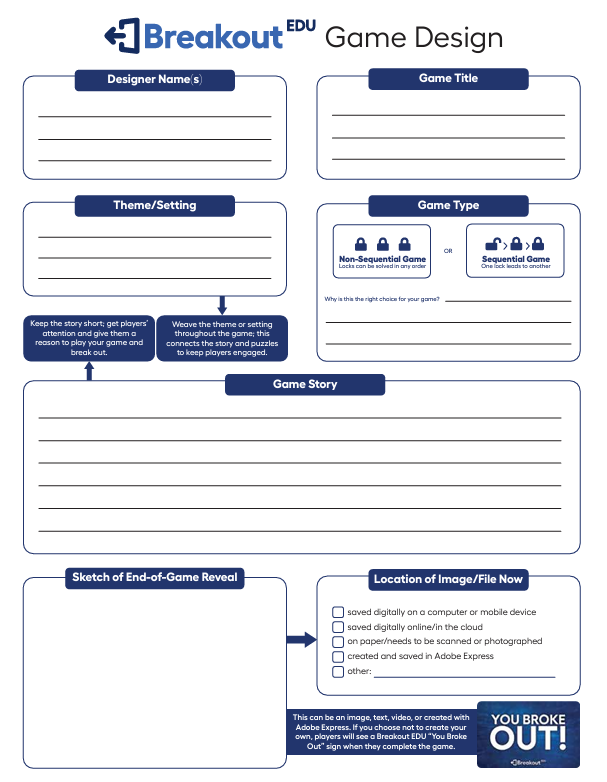
There are a number of elements that you can use to make your own Breakout games. Plus, the platform for building them is the same, regardless of whether you are a teacher or a student.
Get even more from Breakout EDU
Want even more of Breakout EDU? Here are our hand-picked reasons to use the platform:
- The platform is intuitive. Once you click “Create a Game,” the system walks you through the process.
- Locks can be sequential, one leading to another, but they don’t have to be! You can choose to have non-sequential locks that can be opened in any order!
- Lock types include text, numbers, shapes, colors, and even directions.
- You can also add “non-lock” content, such as videos, audios, or PDF documents. This content can further enhance the game with background information, context, additional clues, or even a brain break!
- Integration for creating with Adobe Express is directly embedded in the platform, but you can also upload your own images. Therefore, if you prefer to design in Canva or another software, you can!
- You can even customize the “end-of-game reveal” with an image, text, video, or Adobe Express.
- Breakout EDU also provides templates for creating kit-based/physical clues, such as a message to decode with the Red Lens Viewer.
- Student Game Design goes through a teacher-approval process and can be added to the class library for peers to enjoy.
- The platform helps develop brainstorming and planning with Game Design Strategies – implementing transferable skills like organization, creativity, and critical thinking.
- Games can follow themes on any topic. Therefore, you can always create a game that directly ties to student learning in the classroom in a fun and innovative way.
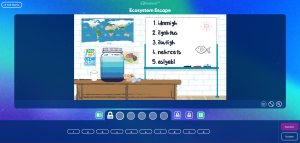
Creating and playing breakout games is not only a fun process, but it can also make the material “stick.” It’s all about making memorable experiences in the classroom.
If you want to see all of this in action, check out our OTIS session, Break into a New Year with Breakout EDU. So, what are you waiting for? Let’s get building! We can’t wait to hear about what you create!
For more tips, tricks, and tools for teaching in and out of the classroom, check out more content on the Teq Talk blog or our YouTube channels OTIS for educators and Tequipment.
We also offer virtual professional development, training, and support with OTIS for educators. Explore the technology and strategies that spark student success — no matter where teaching or learning are happening!
Follow us on social:
 edteq
edteq  OTIS4educators | Teq Products | iBlocks
  MyTeq
MyTeq  Teq
Teq
Related Articles & Other Recommended Reading

How to Safely Store Your AR/VR Headsets for the Summer
As the school year comes to a close, properly preparing your AR/VR hardware for summer storage is essential to extending the lifespan of your investment. Taking a few deliberate steps ensures that when teachers and students return in the fall, their headsets, controllers, and charging carts will be clean, functional, and ready for classroom use. […]

Teq Tuesdays: Summer PD Lineup
Summer is here, and so are Teq’s annual summer PD sessions! Join us on select Tuesdays in July and August for a variety of engaging professional learning experiences. Our summer PD lineup this year dives into unlocking the full potential of AI and brushing up on core Google Workspace skills. All sessions will be broadcast […]

What AI Tools Are Teachers Actually Using?
While having a variety of AI tools at your fingertips is helpful, the number of options can feel overwhelming. In our OTIS for educators session, “Demystifying AI Tools,” we’ll dive into the top AI platforms being used in education. We’ll uncover their ideal use cases, abilities, and limitations so that you can find the best fit(s) […]