Introducing the New Elementary Experience in Schoology
Nicole Mathew
Curriculum Specialist
Teq News
Teq Supports District Implementation: Beyond funding guidance, Teq provides turnkey grant alignment, hardware staging, and certified PD coaching via OTISpd.com to ensure 100% classroom adoption.
Are you using Schoology? Schoology is a powerful learning management system from PowerSchool. Teachers can use it to post instructional content, engaging student activities, assessments, grades, third-party content, and more! Prior to 2021, all users, regardless of grade level, had the same view and user experience. Having a uniform layout can pose some difficulties for teachers of young learners because of the unique needs of students in this population. Schoology has listened and answered with a new upgrade called the Elementary Experience! With the new Elementary Experience, teachers can provide a more user-friendly place for students to access content and complete assignments.
Why use the new elementary school experience?
Schoology’s new setting makes it easier for younger students to access user-appropriate activities in a streamlined view, making it perfect for early and pre-readers. Teachers are able to choose a featured image to pair with any folder or assignment. These images, when intentionally selected to reflect the associated content, can make all the difference and help students navigate the virtual class with more independence. Not only does enabling the Elementary Experience alter the view, but there are also more response options for students to show mastery. Students can submit drawings, photos, typed work, uploaded files, or recordings to complete their assignment and demonstrate understanding. This can help level the playing field when it comes to students’ technology skills and literacy levels.
If you’re ready to get started, there are some things to keep in mind. You do need to enable the experience for each individual class within the course settings. This is perfect for providing teachers the flexibility to make this change on a per-section basis. The change should be done prior to adding any course content or students. It is also important to note that the Elementary Experience only affects the students’ view. To view how your students see content, or for modeling purposes, you will need to view the course as a student from the member page.
How to activate the elementary experience
Ready to get started? Follow these step-by-step instructions!
- First, go to the course options menu, located below the course profile image.
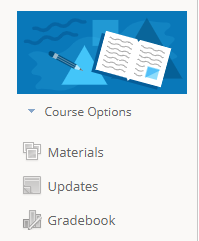
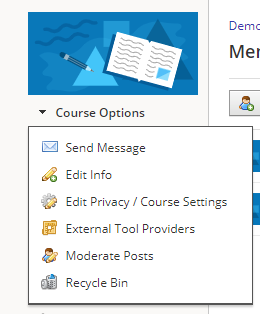
- Then, select “Edit Privacy/Course Settings.”
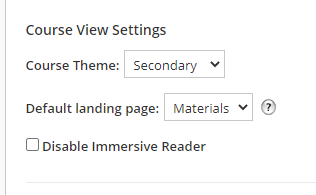
- When you are in the settings, scroll all the way down to the bottom to the section, “Course View Settings.” Edit the field marked “Course Theme.” The default will be shown as “Secondary.”
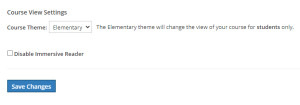
- Once you have changed the theme to elementary, be sure to click “Save Changes.”
Now, you’re ready to get started using the Elementary Experience! Try it out to see what a difference it can make for your younger learners. We’d love to hear how you are liking the Elementary Experience (or any other Schoology related content); please reach out to us at OTIS@teq.com or on our social channels. If you’re interested in more Schoology content, be sure to check out our course library and skills videos on OTIS for educators.
For more tips, tricks, and tools for teaching in and out of the classroom, check out more content on the Teq Talk blog or our YouTube channels OTIS for educators and Tequipment.
We also offer virtual professional development, training, and support with OTIS for educators. Explore the technology and strategies that spark student success — no matter where teaching or learning are happening!
Follow us on social:
 edteq
edteq  OTIS4educators | Teq Products | iBlocks
  OTIS4educators | MyTeq
  Teq
Teq
0 thoughts on “Introducing the New Elementary Experience in Schoology”
Related Articles & Other Recommended Reading

How to Safely Store Your AR/VR Headsets for the Summer
As the school year comes to a close, properly preparing your AR/VR hardware for summer storage is essential to extending the lifespan of your investment. Taking a few deliberate steps ensures that when teachers and students return in the fall, their headsets, controllers, and charging carts will be clean, functional, and ready for classroom use. […]

Teq Tuesdays: Summer PD Lineup
Summer is here, and so are Teq’s annual summer PD sessions! Join us on select Tuesdays in July and August for a variety of engaging professional learning experiences. Our summer PD lineup this year dives into unlocking the full potential of AI and brushing up on core Google Workspace skills. All sessions will be broadcast […]

What AI Tools Are Teachers Actually Using?
While having a variety of AI tools at your fingertips is helpful, the number of options can feel overwhelming. In our OTIS for educators session, “Demystifying AI Tools,” we’ll dive into the top AI platforms being used in education. We’ll uncover their ideal use cases, abilities, and limitations so that you can find the best fit(s) […]