3 Immersive CTE Experiences with zSpace
Christine Bell
Editor
News
Teq Supports District Implementation: Beyond funding guidance, Teq provides turnkey grant alignment, hardware staging, and certified PD coaching via OTISpd.com to ensure 100% classroom adoption.
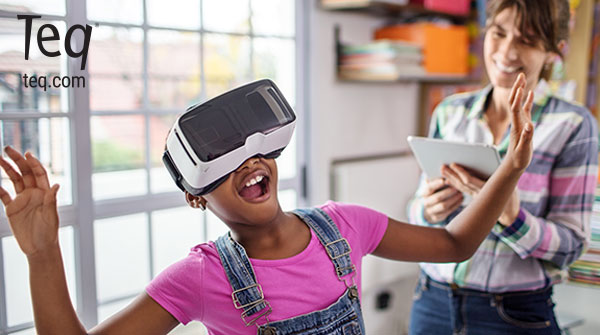
Looking for an ingenious way to launch or invigorate your career and technical education (CTE) programming? Look no further than zSpace! zSpace is the complete AR/VR system that allows students to have unparalleled, hands-on experiences in CTE fields. Plus, students can learn the essentials without any of the mess or fuss involved in other methods of hands-on CTE learning. Here are three ways you can use zSpace to bring your CTE programs to the next level.
1. Build automotive mechanic skills in zSpace’s virtual mechanic shop
Students learning about the automotive industry can gain essential experience with the inner workings of engines and other automotive mechanics without getting their hands dirty! The Automotive Mechanic by GTAFE program through zSpace offers learners the opportunity to assemble and disassemble an automobile through their virtual mechanic shop. This innovative program allows students to see each part of the machine, manipulate them, and repeat procedures with safety guaranteed.
Learners can work on different automotive systems including suspension, brakes, engine, and transmission. It’s perfect for preparing students for the real world and for careers in the automotive industry. Hybrid and electrical vehicle applications greatly expand the opportunities available to students. Plus, zSpace helps eliminate consumables, reduces training space, and allows students to prepare for industry certifications. Options within the automotive offerings from zSpace will prepare students for careers in automotive technology. This includes diesel technology, heavy equipment maintenance & repair, light gas & truck maintenance, and small engine technology.
2. Learn human anatomy and physiology with VIVED Anatomy and zSpace
The anatomy program on the zSpace is provided by VIVED and is used by health professionals and students at every level. A clean and safe alternative to traditional labs, anatomy on zSpace allows for virtual dissection, saved lab sessions, and even quizzes that support your curriculum! Within the program, you can isolate organs or structures to study them more in–depth. In addition, you have the ability to see how different structures fit together and function. Each part is easy to manipulate and is labeled. From muscles of the foot to sections of the brain, it’s really a head-to-toe experience.
This is great for both self-study and customizable curriculums. Students can even use this program to prepare for ECG certification. This is a perfect way to prepare students in the anatomy field. For example, diagnostic technicians, ECG technicians, health assistance, nursing assistants, practical nursing, and therapeutic services.
3. Discover principles of advanced manufacturing with 3D modeling in zSpace
With the Advanced Manufacturing Mechanical program by Fun2 on zSpace, students will be able to explore 3D model components and animations for a wide range of manufacturing processes. The program guides students through various parts of manufacturing mechanisms. It also includes options for perspective manipulation, application and interaction of parts, part sectioning. It even includes an exploded view for seeing those small details. Plus, the program allows for exceptional visuals that will allow students to identify potential issues and work on problem solving and troubleshooting. This can happen all without involving heavy machinery.
In addition to engineering fundamentals, students can design, program, and simulate functionality of programmable logic controllers (PLCs), hydraulic systems, and pneumatic systems. All of this can prepare students for careers in computer–aided design, electronics, industrial electronics, manufacturing technology, mechatronics, engineering, turbine maintenance, and more.
See what Teq has to offer with AR/VR
Overall, augmented and virtual reality (AR/VR) tools like zSpace help students have impactful, immersive experiences. This allows students to build their knowledge base and technical skills. They also have the added benefit of being safe and simple to implement. For instance, any of the above programs can be implemented in any classroom setting without the need for additional equipment. There’s a lot more you can do with zSpace for virtually any curriculum or grade level. From simple math to advanced CTE applications, there’s something for everyone. ZSpace is a great tool to offer students a highly accessible, hands-on experience. This experience is also optimal for certification and practical assessment preparation. Moreover, zSpace has also partnered with NOCTI to enable students to earn up to 33 industry credentials!
Lastly, if you’re interested in seeing other zSpace programs or scheduling a demo, please contact a Teq representative.
For more tips, tricks, and tools for teaching in and out of the classroom, check out more content on the Teq Talk blog or our YouTube channels OTIS for educators and Tequipment.
We also offer virtual professional development, training, and support with OTIS for educators. Explore the technology and strategies that spark student success — no matter where teaching or learning are happening!
Follow us on social:
 edteq
edteq  OTIS4educators | Teq Products | iBlocks
  OTIS4educators | MyTeq
  Teq
Teq
0 thoughts on “3 Immersive CTE Experiences with zSpace”
Related Articles & Other Recommended Reading

How to Safely Store Your AR/VR Headsets for the Summer
As the school year comes to a close, properly preparing your AR/VR hardware for summer storage is essential to extending the lifespan of your investment. Taking a few deliberate steps ensures that when teachers and students return in the fall, their headsets, controllers, and charging carts will be clean, functional, and ready for classroom use. […]

Teq Tuesdays: Summer PD Lineup
Summer is here, and so are Teq’s annual summer PD sessions! Join us on select Tuesdays in July and August for a variety of engaging professional learning experiences. Our summer PD lineup this year dives into unlocking the full potential of AI and brushing up on core Google Workspace skills. All sessions will be broadcast […]

What AI Tools Are Teachers Actually Using?
While having a variety of AI tools at your fingertips is helpful, the number of options can feel overwhelming. In our OTIS for educators session, “Demystifying AI Tools,” we’ll dive into the top AI platforms being used in education. We’ll uncover their ideal use cases, abilities, and limitations so that you can find the best fit(s) […]