Using Piper to Introduce CS and Boost Student Confidence
Rebekah Corace
Curriculum & PD Specialist
News
Teq Supports District Implementation: Beyond funding guidance, Teq provides turnkey grant alignment, hardware staging, and certified PD coaching via OTISpd.com to ensure 100% classroom adoption.
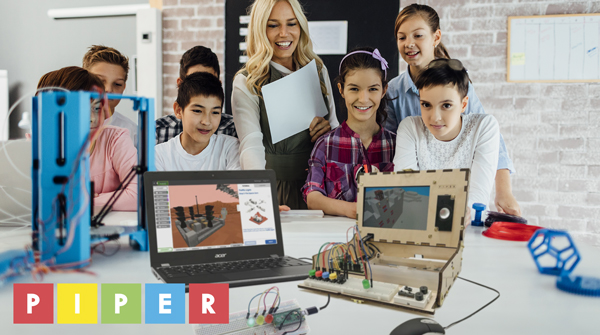
Looking to try something new and different in your classroom? Look no further than Piper Inc.! Piper brings both physical building and digital learning to your students! Piper’s inaugural product is a build-it-yourself computer kit that focuses on electrical circuitry and coding.
Piper is the brainchild of Cofounder and Co-CEO, Shree Bose, who won the first ever Google Science Fair in 2011, when she was just seventeen years old! The primary goal of her STEAM education company is to have students become creators rather than just consumers of technology. Harnessing the popularity of Minecraft is also what makes Shree’s educational toy such a success. In addition to the Build Kit, Piper also launched Piper Make. Piper Make is a Chromebook-compatible, integrated hardware and software solution which serves as an easy introduction to physical computing.
While Piper’s offerings have blossomed over the last few years to include many different avenues for playing and learning, their build-it-yourself computer kit is still the best entryway for students. Let’s take a deeper dive into all that this kit has to offer!
Tips and tricks to help build your computer
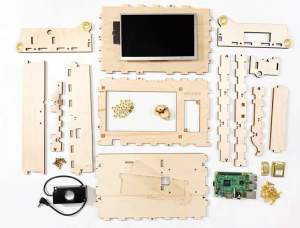
The tagline “Welcome Makers” greets you and your students as you unbox your kit! A helpful tip to introduce your students to all of the parts that come in the kit is to have them do an unboxing/inventory to familiarize themselves with it, prior to building.
Piper recommends two students per kit for an optimal building experience. Students are encouraged to use the large blueprint provided as a visual reference during the build. I also found it helpful to watch the build video from the website while building as well. I recommend that each group of students have a device (Chromebook) that they can have the video queued up on to pause, play, and rewind during the build. This is another way to guide them on their building journey.
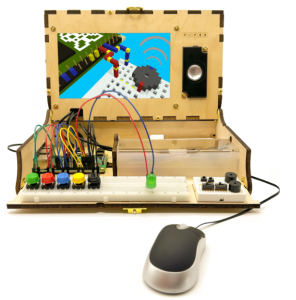
Do-it-yourself tips and tricks
Some other helpful tips and tricks are to use the top of a copy paper box or lunch tray to build the computer in. This helps minimize the chance that parts will go missing during the build, while also providing the perfect place for students to keep the computer if they don’t complete the build in one class period. Speaking of parts going missing, since there are many small parts, use small trays or cups to keep each of the individual parts in for easy access during the building process. Don’t stress if you do happen to lose any pieces since Piper sells replacement kits! You can also use your school’s 3D printer to print replacement parts if needed! This is a great and fun way to incorporate more STEM products into your classroom while solving a real world problem!
Piper StoryMode
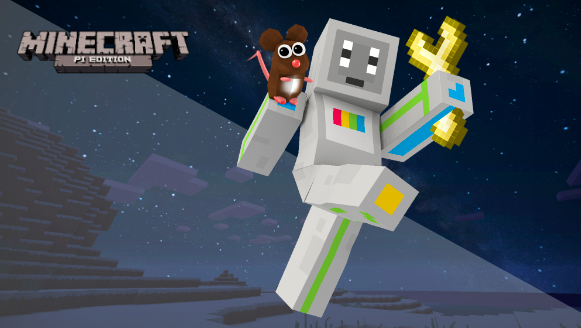
Once you have the computer built, it is actually just the beginning of the adventure! Students can access the virtual storytelling component by diving into the world of Minecraft: Pi Edition. When you power up the battery pack, you are brought to the desktop. Students will click on the “Piper” icon and are brought to “StoryMode.” Here, they will help the character, Pip, complete missions in space. First stop, Mars! There are eleven levels for students to navigate through, each with a different task to complete. Through “StoryMode,” students will use trial and error to correctly code the game.
Students will discover electronics by learning about circuits, inputs, outputs, and wiring while using a breadboard with buttons, switches, buzzers, LED lights, and more! Once students finish the core levels in “StoryMode,” they are ready to dive into “CreativeMode” where they can build with the circuits they learned about in the previous modules.
Still looking for more? Go to the “PiperCode” section of the website for multiple curated projects students can continue to explore using block-based coding language, Blockly. With projects from PiperCode, students will learn about the foundational principles of computer science such as loops, sequences, and events.
Standards-alignment
Piper is best suited for grades 3-5 and can be used in the classroom or in an afterschool program or enrichment class. Piper is a perfect way to incorporate the Computer Science and Digital Fluency (CSDF) Standards into your curriculum. Additionally, Piper is aligned to the Next Generation Science Standards (NGSS) and ISTE Standards. Piper helps students explain their critical thinking and also focuses on building confidence in problem solving skills, especially in young girls. After completing the build and video game portion, female students reported that they enjoyed solving difficult problems.
I hope that after reading all that Piper has to offer, you will consider it for your next addition to boost STEM in your classroom! Also, be sure to check out the Piper Website where they offer a ton of resources and support. In addition, check out our accompanying OTIS course, Welcome to Piper Basics, as well as the many other courses we offer in the OTIS Course Library. Stay tuned for further courses where we will dive deeper into the wonderful world of Piper!
For more tips, tricks, and tools for teaching in and out of the classroom, check out more content on the Teq Talk blog or our YouTube channels OTIS for educators and Tequipment.
We also offer virtual professional development, training, and support with OTIS for educators. Explore the technology and strategies that spark student success — no matter where teaching or learning are happening!
Follow us on social:
 edteq
edteq  OTIS4educators | Teq Products | iBlocks
  OTIS4educators | MyTeq
  Teq
Teq
0 thoughts on “Using Piper to Introduce CS and Boost Student Confidence”
Related Articles & Other Recommended Reading

How to Safely Store Your AR/VR Headsets for the Summer
As the school year comes to a close, properly preparing your AR/VR hardware for summer storage is essential to extending the lifespan of your investment. Taking a few deliberate steps ensures that when teachers and students return in the fall, their headsets, controllers, and charging carts will be clean, functional, and ready for classroom use. […]

Teq Tuesdays: Summer PD Lineup
Summer is here, and so are Teq’s annual summer PD sessions! Join us on select Tuesdays in July and August for a variety of engaging professional learning experiences. Our summer PD lineup this year dives into unlocking the full potential of AI and brushing up on core Google Workspace skills. All sessions will be broadcast […]

What AI Tools Are Teachers Actually Using?
While having a variety of AI tools at your fingertips is helpful, the number of options can feel overwhelming. In our OTIS for educators session, “Demystifying AI Tools,” we’ll dive into the top AI platforms being used in education. We’ll uncover their ideal use cases, abilities, and limitations so that you can find the best fit(s) […]