5 Reasons to Use Your Interactive White Board as Assistive Technology
Emma Foley
Senior Curriculum Specialist
Blog
Teq Supports District Implementation: Beyond funding guidance, Teq provides turnkey grant alignment, hardware staging, and certified PD coaching via OTISpd.com to ensure 100% classroom adoption.
With current research showing that roughly 1 in 5 kids in the United States have learning and attention disorders, including dyslexia and attention deficit hyperactivity disorder (ADHD), educators are constantly being put to the test to accommodate the varying needs of the students sitting in their classroom. In addition to students with disabilities, teachers are constantly revisiting their instructional practices to support the 1 in 10 students in their classrooms that are learning English as a second language.
Luckily, companies offering interactive whiteboards (IWBs) like SMART, Promethean, Boxlight, Newline, and Epson support varied learning environments with continuously evolving classroom technology. So, how exactly do these IWBs support you in the classroom? Whether you are in a self-contained, co-taught, general education classroom, or even an out-of-classroom support service provider, IWBs can support your students with a variety of tools. Let’s jump into my top five assistive technology aspects of your SMART Board (and other IWBs)!
1: Pen options, finger inking, and soft objects as manipulation tools!
If you have an interactive whiteboard in your classroom, you most likely have a set of pens that your students can use to interact with the board. This is most likely the go-to method for completing handouts and annotating on the board, but sometimes this doesn’t work for some of our students, especially those with fine motor challenges!
If you are looking for adaptive options for your students beyond switching up the pen tool itself, the SMART Inking toolbar gives you the option to turn on finger-inking for your students with fine motor limitations, or even your whole class. The process for enabling finger-inking may vary depending on whether you have a device physically tethered to your IWB, or if you are working off an operating system built into the board, such as the IQ module on your SMART Board. Either way, it only takes a couple of clicks to give your students the ability to mark up your board with just their finger!
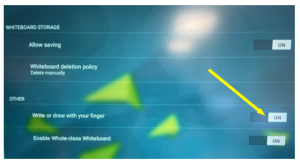
Students can also use a soft object, like a tennis ball or beanbag, to interact with the whiteboard. The SMART Notebook software can then convert these handwritten annotations into text using its handwriting recognition capabilities.
2: Spotlight and Screen shade
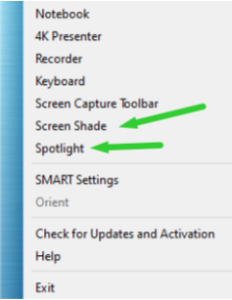
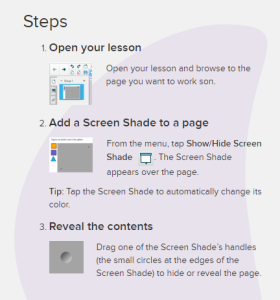
Within SMART Notebook, the “Spotlight” and “Screen Shade” features allow educators to block off certain areas of the SMART Board which they might not want students to see just yet, as they may be overwhelmed. This is perfect for students with ADD/ADHD or executive functioning and motor planning impairments. This can be easily accessed from the SMART Notebook icon on the desktop toolbar!
3: Shape Recognition Pen
What support can we provide to students who may feel like they are not creative or artistic enough to participate in activities that require drawing skills? We’ve all been there! You have probably tried to tell a student that even the most experienced artist feels discouraged and frustrated at times, but the student still becomes discouraged when their fine motor skills keep them from participating the same way their peers do during a basic drawing activity.
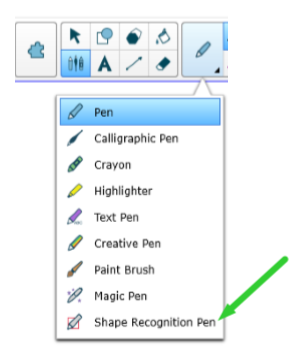
Many educators might not know this, but SMART notebook actually has a feature called the “Shape Recognition Pen” that can help students with fine motor skills not become discouraged and can minimize the likelihood of an emotional shut down. Having this option is a great backup for educators pushing out math or art activities to students.
4: Highlighter pen
The “Highlighter” pen option can help an educator emphasize parts of a text or accentuate instructions for students who become easily distracted. Similar to the “Screen Shade” and “Highlight” tools, this is a great option for students with ADD/ADHD or executive functioning and motor planning impairments. This can be easily accessed from the same pen icon as the shape recognition pen, or you can go into the tools dropdown menu within the top toolbar in SMART Notebook.
5: Pre-lined Paper Templates
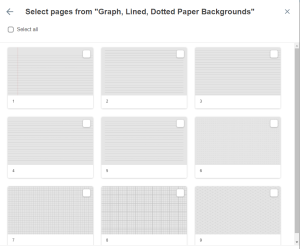
This last feature, available on most of the associated software for IWBs, is definitely the most used feature during my time in the special education classroom. Pre-lined paper templates on the SMART Notebook software or the IQ module can make it easier for students with fine motor limitations, such as dysgraphia, to keep their writing on straight and appropriately sized.
To learn more about IBWs and assistive technology, check out our categories on OTIS for educators. We have dedicated sections for SMART Boards, assistive technology, exceptional/special education and much more.
For more tips, tricks, and tools for teaching in and out of the classroom, check out more content on the Teq Talk blog or our YouTube channels OTIS for educators and Tequipment.
We also offer virtual professional development, training, and support with OTIS for educators. Explore the technology and strategies that spark student success — no matter where teaching or learning are happening!
Follow us on social:
 edteq
edteq  OTIS4educators | Teq Products | iBlocks
  OTIS4educators | MyTeq
  Teq
Teq
0 thoughts on “5 Reasons to Use Your Interactive White Board as Assistive Technology”
Related Articles & Other Recommended Reading

How to Safely Store Your AR/VR Headsets for the Summer
As the school year comes to a close, properly preparing your AR/VR hardware for summer storage is essential to extending the lifespan of your investment. Taking a few deliberate steps ensures that when teachers and students return in the fall, their headsets, controllers, and charging carts will be clean, functional, and ready for classroom use. […]

Teq Tuesdays: Summer PD Lineup
Summer is here, and so are Teq’s annual summer PD sessions! Join us on select Tuesdays in July and August for a variety of engaging professional learning experiences. Our summer PD lineup this year dives into unlocking the full potential of AI and brushing up on core Google Workspace skills. All sessions will be broadcast […]

What AI Tools Are Teachers Actually Using?
While having a variety of AI tools at your fingertips is helpful, the number of options can feel overwhelming. In our OTIS for educators session, “Demystifying AI Tools,” we’ll dive into the top AI platforms being used in education. We’ll uncover their ideal use cases, abilities, and limitations so that you can find the best fit(s) […]